

How guardrails work
A guardrail is a rule about your project that Owl PM checks on every change: "every activity has a successor," "no crew is booked over 100%," "nothing outside procurement runs longer than two weeks." When the schedule breaks a rule, Owl marks the work that breaks it, on the Gantt and in the project tree, and the rule stays checked from then on, whether the change came from you, a teammate, or Owl.
Guardrails also steer Owl. Every rule you set is one Owl works to satisfy when it builds, edits, or fixes the schedule.
The idea in one sentence
A guardrail is a true/false formula, checked for each row of a table. For each activity (or resource, relationship, WBS node, and so on), the formula says TRUE when that row is fine and FALSE when it breaks the rule. The rows where it's FALSE are the guardrail's failures.
Take "no activity longer than 10 working days." Written as a formula, it's one line, checked for each activity:
[Duration] <= 10d
An activity of 11 days gives FALSE, so it fails. An activity of 3 days gives TRUE, so it passes. A row where the formula comes out blank isn't checked at all, which is how a guardrail skips rows it isn't about.
Note: Guardrails use the same formula language as formula columns. You don't need to know it to use guardrails (Owl writes them for you), but if you want to read or edit one, start with Introduction to formulas.
Anatomy of a guardrail
Every guardrail opens as its own tab. Click one in the Guardrails list in the project tree, in the status-bar summary, or on a pill on the Gantt.
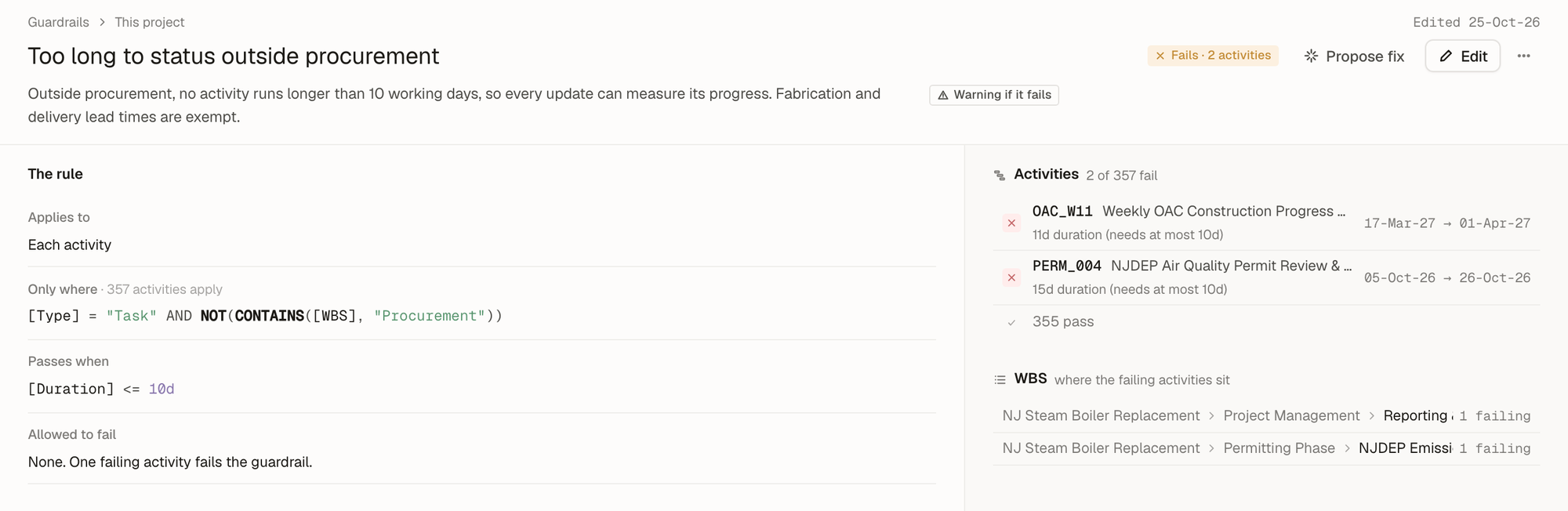 123451The name says what goes wrong, the description says why it matters, and the badge says how bad a failure is: Error or Warning.2The status: here it fails on 2 activities. Propose fix hands the failures to Owl; Edit changes the rule.3The rule: which rows it checks, the formula they must pass, and how many may fail.4The rows that fail, each with its value and what it needed ("15d duration, needs at most 10d").5Where the failures sit in the WBS.
The rule has five parts, top to bottom (Only where and Definitions are optional):
| Part | What it does |
|---|---|
| Applies to | The table it checks: each activity, each resource, each relationship, the project as a whole, and so on. |
| Only where | Narrows the rows it checks. Here, tasks outside procurement: [Type] = "Task" AND NOT(CONTAINS([WBS], "Procurement")). Empty means every row. |
| Definitions | Optional named parts of a long rule, so the rule reads in words. A default like Nothing follows this activity defines fs, ff and limit, then uses those names in its rule. |
| Passes when | The true/false formula each row must pass: [Duration] <= 10d. |
| Allowed to fail | The tolerance: none (one failure fails the guardrail), at most N rows, or at most N% of the rows it checks. That's how standard thresholds like "no more than 5% of activities" are written. |
Severity decides how a failure counts. An error (red) is a hard rule that's broken. A warning (amber) is worth a look but may be acceptable. A guardrail whose failures are all within its tolerance passes, and its failing rows show in grey.
A guardrail can also be broken: its formula can't be checked any more, for example because a column it reads was deleted. Its page says so in a violet banner. The schedule may be fine; the rule needs fixing.
The guardrails every project starts with
Every project comes with a set of default guardrails. You don't set them up, and they apply to imported schedules and schedules Owl builds alike.
| Guardrail | What it checks |
|---|---|
| Nothing drives this activity's start | Each activity has a close predecessor, so its start is held by logic, not only a date. |
| Nothing follows this activity | Each activity has a close successor, so a delay to it reaches the work after it. |
| This activity sits outside the WBS / No activities sit under this WBS node | Activities belong to the project's WBS, and every WBS node has work under it. |
| No activity accounts for this deliverable / This activity doesn't trace to a deliverable | Every deliverable has activities that build it, and every activity says which deliverable it serves. |
| Crews are booked beyond what they can do | No labor resource is booked over full time (8h/d) at any moment. |
| Crew sizes swing month to month | Each labor resource ramps smoothly, without idle months between busy ones. |
| DCMA 1 – DCMA 14 | The DCMA 14-point schedule assessment, as warnings, each against its standard threshold: logic, leads, lags, relationship types, hard constraints, high float, negative float, high duration, invalid dates, resources, missed tasks, the critical path test, CPLI and BEI. |
The DCMA checks are warnings, because many of them fail while a schedule is still being built. They matter once it's complete.
Six defaults don't draw on the Gantt unless you turn them on under Show → Which guardrails: DCMA 3, 4, 6 and 8, which flag a large share of most schedules' rows, and the two that aren't about activities (No activity accounts for this deliverable, No activities sit under this WBS node). They're still checked and still count in the status bar.
You can change a default like any other guardrail. The project keeps its own copy, and ⋯ → Restore the default puts the original back.
See them all at once: the Guardrails sheet
Hover Guardrails in the project tree and click the grid icon to open every guardrail as a sheet: one row each, with what it checks, its severity, how it stands now, and its formula.
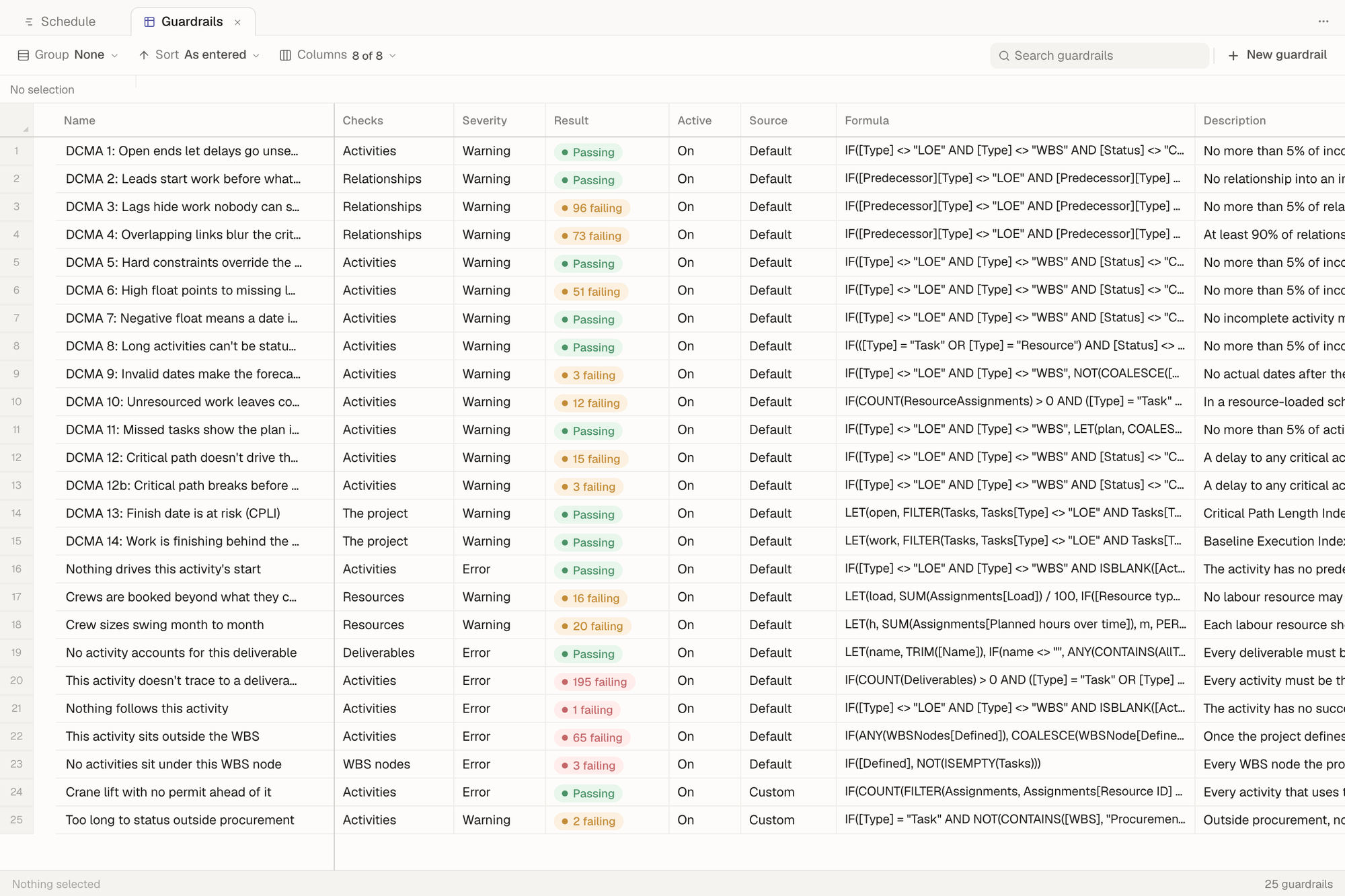 1231Every guardrail: the defaults, then the project's own (Source says which).2Result: passing, or how many rows fail, colored by severity.3New guardrail opens an empty guardrail page.
Name, severity, description and whether a guardrail is on can be edited right in the cells. The rule itself is edited on the guardrail's page.
Ask Owl to write one
The fastest way to add a guardrail is to say the rule in plain words. Owl picks the table, writes the formula, names it for what goes wrong, checks it against your schedule, and tells you what it found, including where the rule is loose.
Asked "Add a guardrail: every activity that uses the hydraulic crane needs a permit activity somewhere before it," Owl found the crane among the project's resources and wrote this:
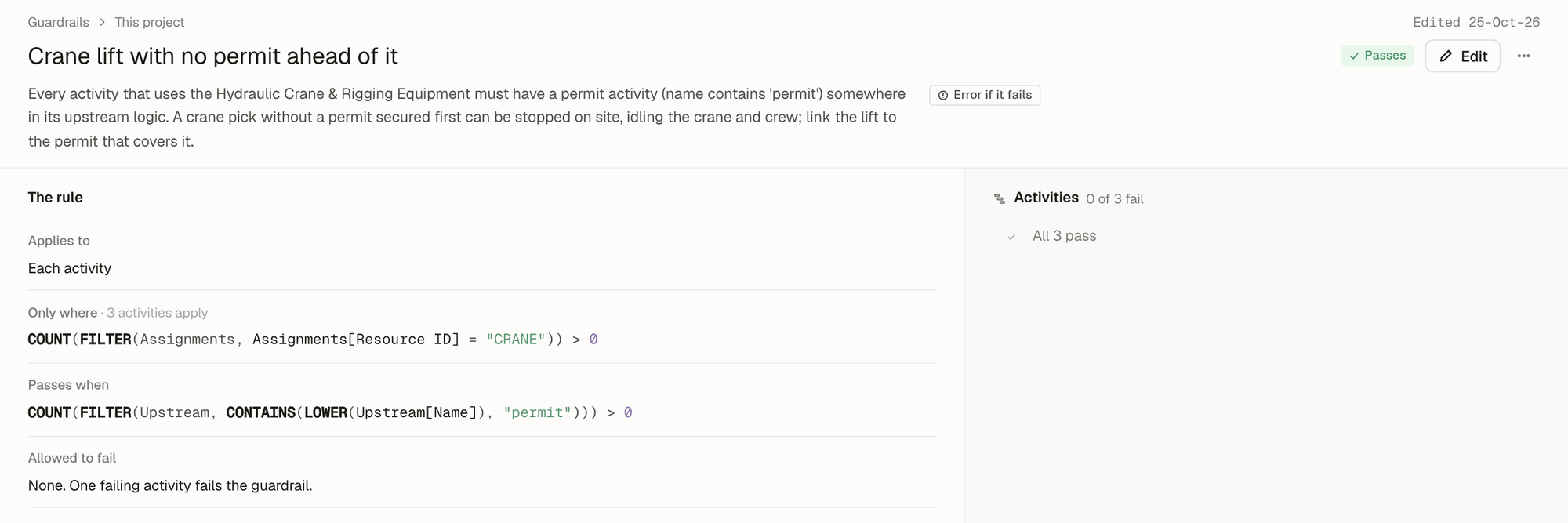 12341Owl named it for what goes wrong and wrote down why it matters.2Only where: the activities with the crane assigned.3Passes when: at least one activity upstream has "permit" in its name.4All 3 crane lifts pass today. From now on, a lift without a permit ahead of it fails.
Owl also writes guardrails on its own when it reads a requirement in your documents ("no boiler shutdown between October 15 and April 15") or hears one from you in conversation. Each one shows up in the Guardrails list like any other, and you can open it to read the rule it wrote.
Write one yourself
Click New guardrail on the Guardrails sheet, or the + next to Guardrails in the project tree. The new guardrail opens in edit mode.
- Name it for the consequence: "Too long to status outside procurement," not "Duration check." The name is what shows on the Gantt next to the failing work.
- Describe it in a sentence: what it protects and why. Owl reads this too.
- Pick Error or Warning.
- Choose what it Applies to, and narrow it with Only where if it doesn't apply to every row.
- Write the rule in Passes when. Click into it for worked examples.
- Set how many rows are Allowed to fail.
As you type, the right-hand column previews what the guardrail would flag if saved now, before anything is saved.
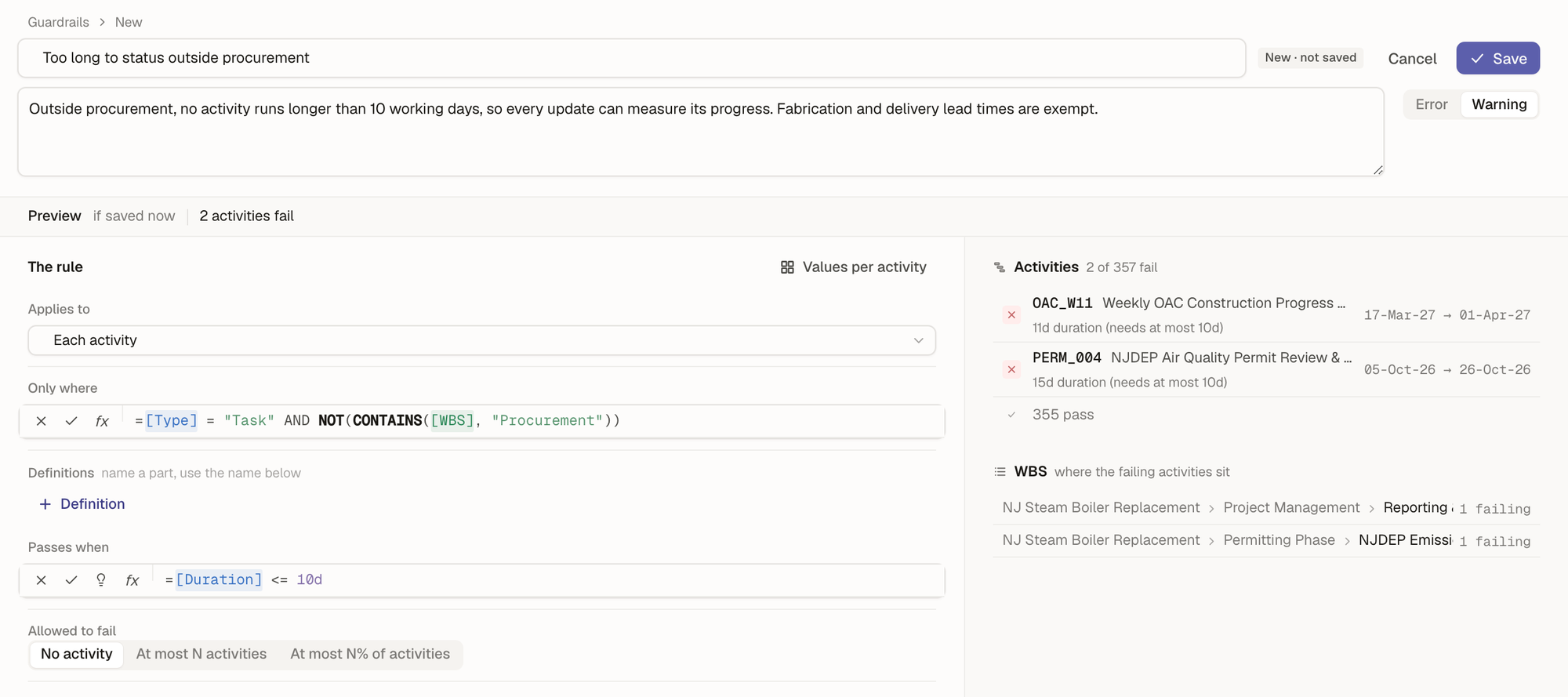 1234561Preview: what the rule would flag if saved now. Here, 2 activities fail.2Only where: tasks outside procurement.3Passes when:
[Duration] <= 10d.4The activities that would fail, with their values.5Values per activity shows every part of the rule worked out for each activity.6Save turns on once the rule works.
Values per activity shows each part of the rule worked out for every activity, so you can see why a row passes or fails. It opens on the failing rows; All shows every activity, and the search box finds any activity by code or name.
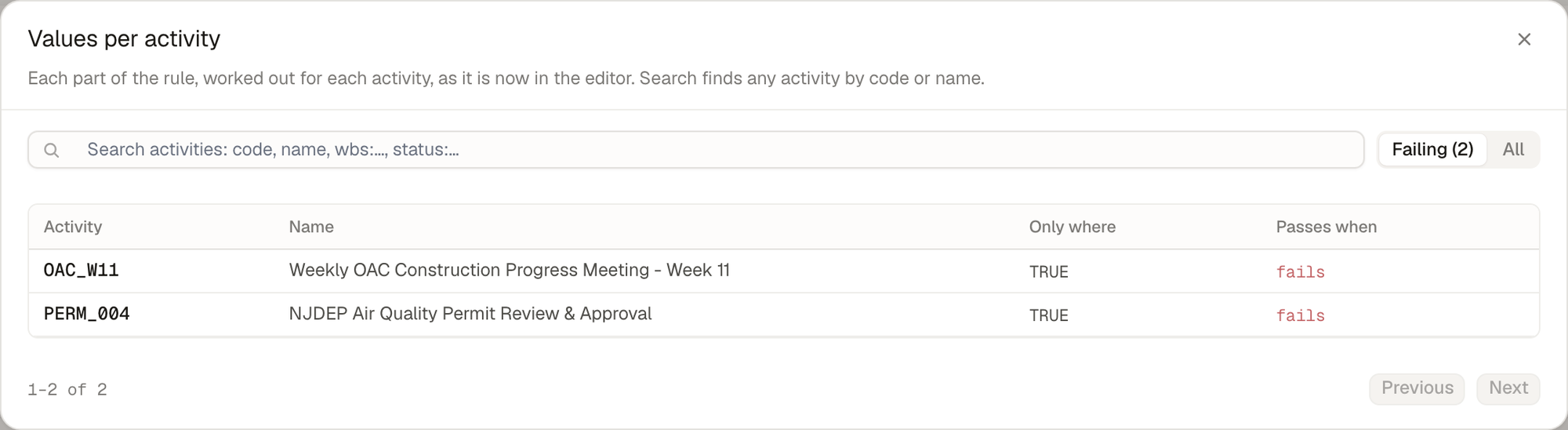 121Search any activity, or switch between Failing and All.2Each part of the rule, worked out for each activity: Only where is TRUE, so it's checked, and Passes when fails.
A few rules show how much a formula can say in one line:
| Rule | Applies to | Passes when |
|---|---|---|
| No negative float on unfinished work | Each activity | IF([Status] <> "Complete", [Total float] >= 0) |
| At least 90% of links are finish-to-start | Each relationship, at most 10% may fail | [Type] = "FS" |
| Every resource is used | Each resource | COUNT(Assignments) > 0 |
| Substantial completion by March 31, 2027 | The project | Project[Finish date] <= DATE(2027, 3, 31) |
The IF without an "else" in the first rule is what skips completed activities: for them the formula is blank, and blank rows aren't checked. For reaching other rows (predecessors, the WBS, a resource's assignments), see Reach other rows. For rules about the baseline or past updates ("nothing slips more than 10 days against the baseline"), see Values over time. Every function is in the function reference.
Tip: If you're not sure how to write a rule, describe it to Owl and then open what it wrote. Reading a working guardrail is the quickest way to learn the pattern.
Guardrails on other tables
A guardrail doesn't have to be about activities. Applies to offers every table in the project:
- Each WBS node, each resource, each assignment (a resource on a task), each relationship, each deliverable, each risk, each calendar, each agent question.
- The project: one check for the whole project, such as a contract completion date or a total activity count. It passes or fails as a whole.
- Your own data tables: each row of a table you imported or made, such as a material delivery log or a cost ledger. A rule like "every delivery maps to an activity in the schedule" is a guardrail on that table. See Tables and data.
The default Crews are booked beyond what they can do is a guardrail on resources. It checks each labor resource's load at every moment, and its failures are resources, each with its peak load.
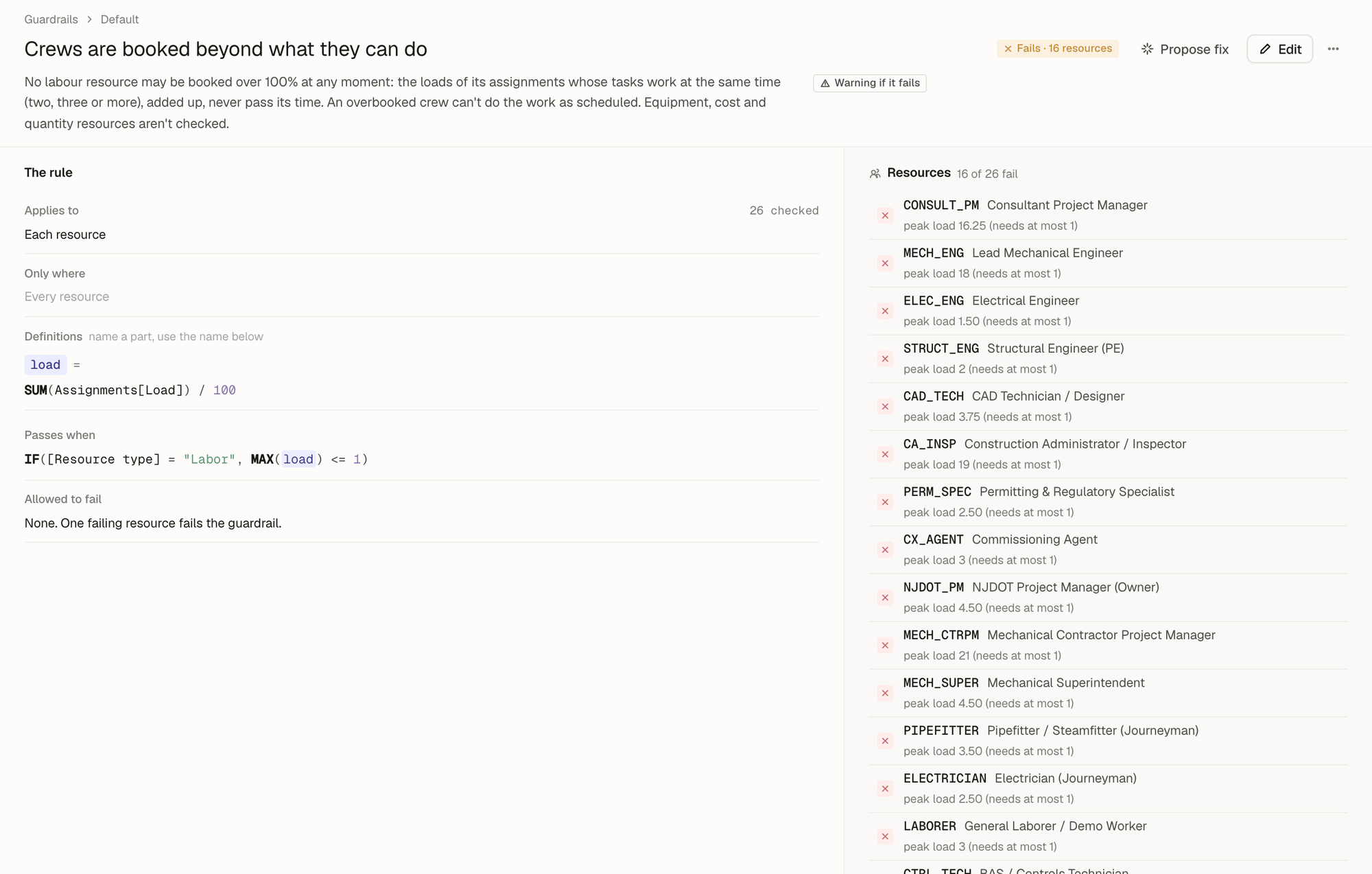 121The rule applies to each resource. The definition
load adds up its assignments' loads at every moment; a labor resource passes when the peak stays at or under 1, one full-time unit (8h/d, also shown as 100%).2The failing resources, each with its peak load.
Note: Owl writes guardrails on activities, the WBS, resources, assignments, relationships, deliverables and the project. A guardrail on risks, agent questions or one of your own data tables you write yourself on the guardrail page, for now.
Turn a guardrail off, or delete it
From a guardrail's ⋯ menu:
- Turn off keeps the rule but stops checking it. It leaves the Gantt and the status bar until you turn it back on.
- Delete removes it. Deleting a default removes it from this project only. To bring a deleted default back, ask Owl: "Restore the default Nothing follows this activity guardrail."
- Restore the default appears on a default you've changed, and puts back the original rule.
Tip: If a rule doesn't apply for now, turn it off rather than deleting it. Off keeps the rule for when it applies again.
What to do next
- See what's failing in Find issues with your schedule.
- Clear the failures in Fix issues with your schedule.
- Vet a schedule you were handed with Audit a schedule.