

Keep resource use realistic
A schedule can be logically valid and still be impossible to build. If the plan needs 100 pipefitters in December and none in January, the software is happy — but no one can hire and lay off a crew like that. Owl PM keeps the schedule achievable two ways: a utilization view that shows how hard each resource is worked over time, and guardrails that flag wild swings and over-allocation and re-check them on every change.
You'll need resources loaded and assigned first.
Step 1 — See utilization over time
Open the Resource Utilization analytic to see a resource's allocated hours week by week.
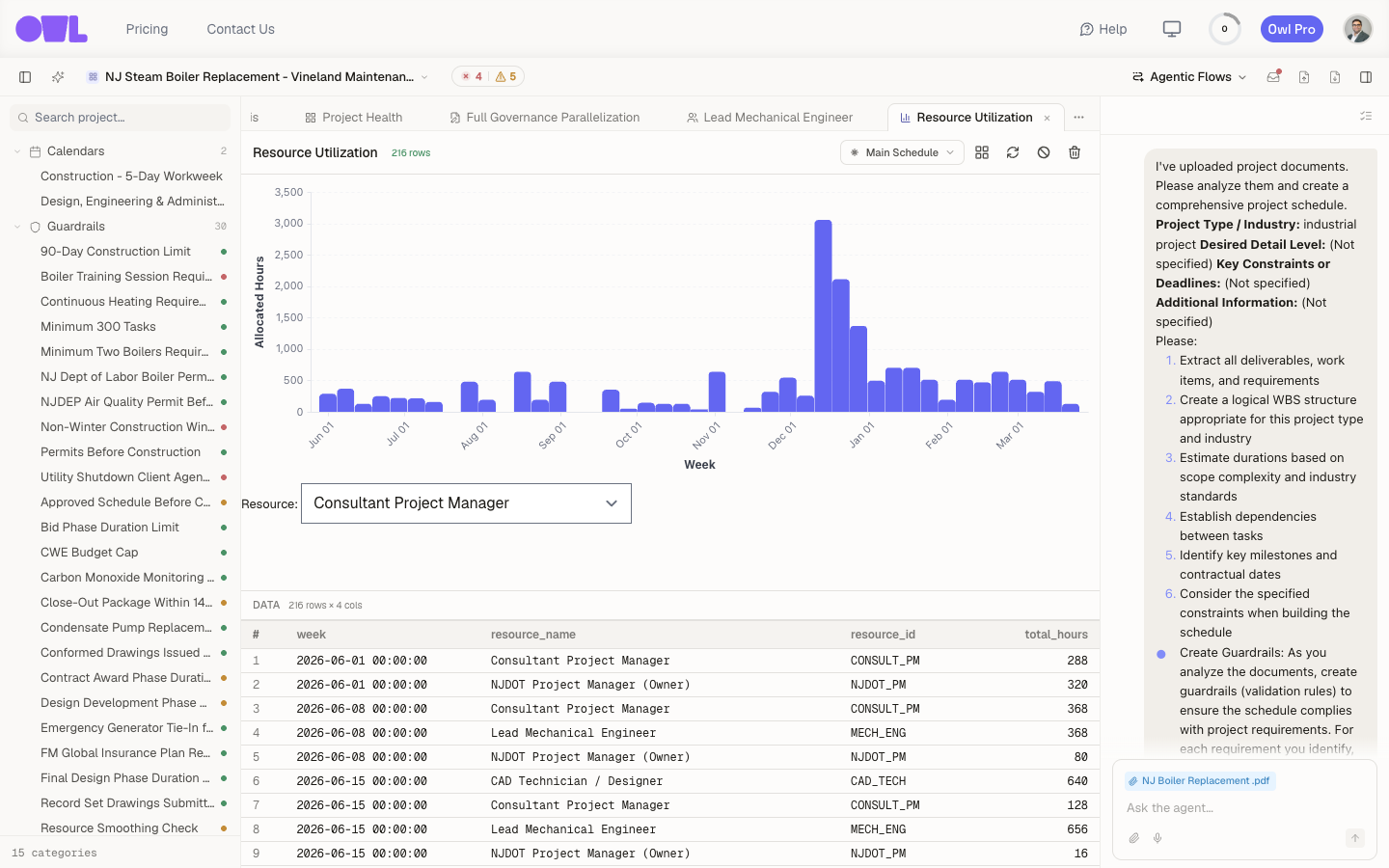 121The sharp spike — allocated hours jump to roughly 3,000 in one stretch, then fall away: the tell-tale sign of a plan you can't staff.2Switch resources with the picker to check each one's profile.
Each bar is a week's workload for the selected resource (switch resources with the picker). A flat, gently ramping profile is staffable. A sharp spike like the one here — allocated hours jumping to roughly 3,000 in one stretch and dropping away on either side — is the tell-tale sign of a plan that looks fine on the Gantt but would require hiring a crew and dismissing it a few weeks later.
Step 2 — Let a guardrail enforce smoothness
Spotting the spike by eye on one resource is fine; catching it across every resource, on every schedule change, is what a guardrail is for. Two guardrails handle this, and both are built in — they run on every project automatically, no setup required:
- Resource Smoothing Check — flags wild month-over-month swings and hire-fire-rehire patterns.
- Resource Over-Allocation Check — flags any resource booked over 100% across tasks that run at the same time (the allocation bars also turn red past 100%).
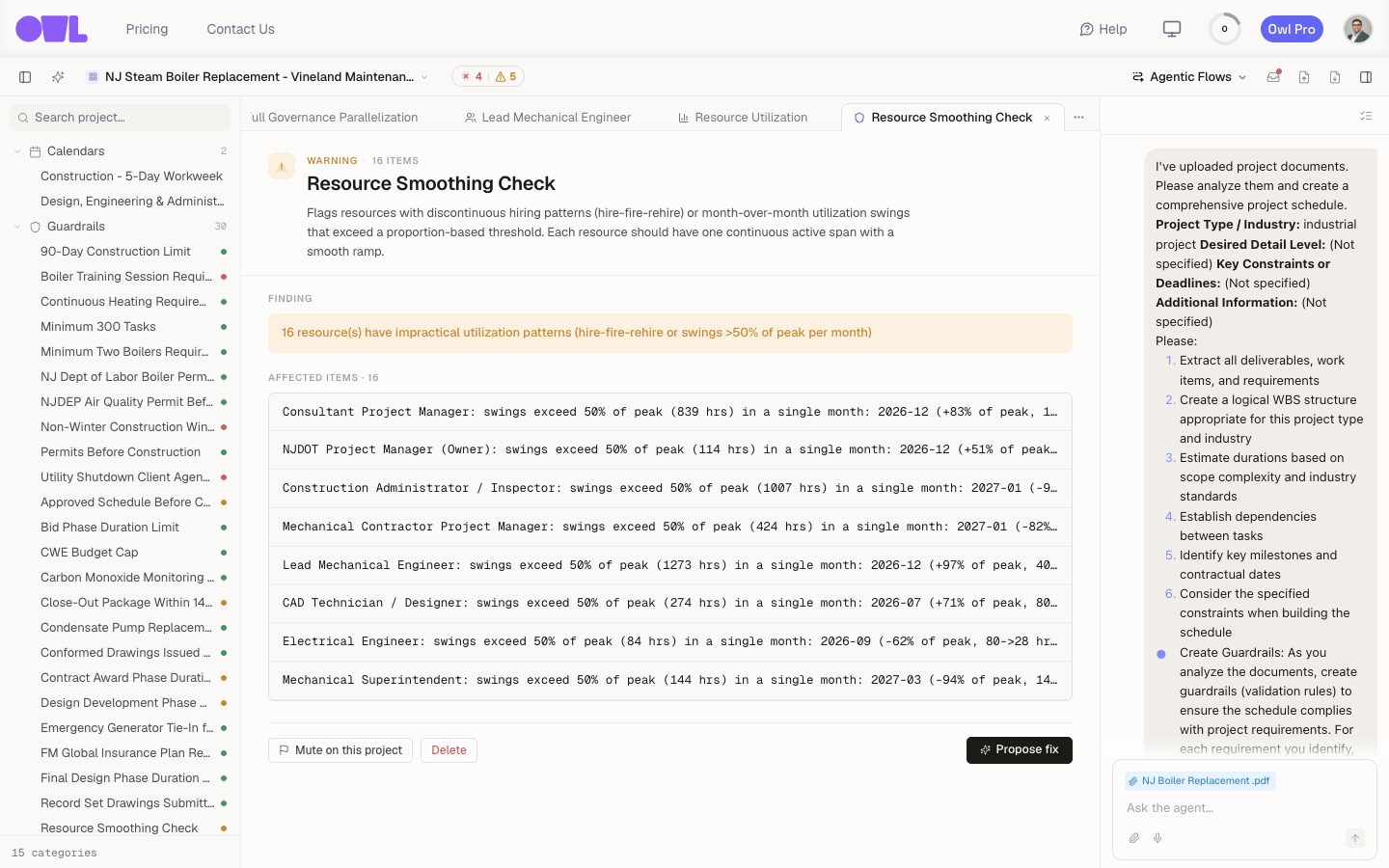 The Resource Smoothing Check guardrail: it flags hire-fire-rehire patterns and month-over-month swings, listing the affected resources.
The smoothing rule reads: "Flags resources with discontinuous hiring patterns (hire-fire-rehire) or month-over-month utilization swings that exceed a proportion-based threshold. Each resource should have one continuous active span with a smooth ramp." Its finding here — 16 resources have impractical utilization patterns (hire-fire-rehire or swings >50% of peak per month) — names each offender, like Consultant Project Manager: swings exceed 50% of peak (839 hrs) in a single month.
Because they're guardrails, they work the way every other check does: they re-run whenever the schedule changes, so a later edit or change order can't quietly reintroduce an unstaffable spike. Together they keep the schedule within what your crews can actually deliver.
Note: Both checks are warning-level and skip cleanly on projects that aren't resource-loaded yet — they only have something to say once resources are assigned. They start working the moment you load resources.
The defaults use a 50%-of-peak swing threshold; you can tune them or add related rules:
Step 3 — Smooth the schedule
When the check fails, resolve it like any guardrail — open it and click Propose fix, or work it out with Owl. The fix is usually to spread the peak work out, re-sequence overlapping tasks, or adjust how much of a resource each task draws, until the profile ramps instead of spikes.
Smoothing can push the finish date out — that's the real trade-off surfacing, and it's better to see it now than to discover mid-project that the plan was never staffable. See Fix issues with your schedule for the full fix-and-revalidate loop.
What to do next
- Confirm the whole plan is sound — Find issues with your schedule shows every guardrail's status, resource checks included.
- Report the staffing picture — put resource utilization on a custom dashboard so peaks are visible alongside cost and progress.